Paid vs Free AI Tools 2026: Which Upgrades Are Actually Worth It?
Paid vs free AI tools in 2026 — the free tier is more capable than most people realise. That is the honest starting point for this comparison. The question is not “should you pay for AI tools?” but “where does paying actually make a difference?” This guide identifies which upgrades are worth the money and which free plans hold up just fine.
How We Tested
We ran free and paid versions of seven major AI tools side-by-side on real tasks over four weeks — comparing output quality, message limits, and the specific features unlocked by paid plans. We measured where the gap was meaningful and where it was marginal.
The Core Question: Where Does Paid Actually Matter?
The upgrade from free to paid is worth it in two situations:
- You hit the free tier’s limits regularly — message caps, usage restrictions, or feature gates slow your work
- The paid tier unlocks a specific feature that genuinely changes your output — not just “more of the same”
Paying for AI tools for status, or because you think a paid tool must be better, is money wasted. This guide identifies exactly which paid upgrades clear both tests.
I ran the free and paid tiers of Claude, ChatGPT, Rytr, and Grammarly side by side for four weeks on a real content workflow: one 800-word article, five client emails, and one research brief per week. Claude Free and ChatGPT Free both hit their limits by mid-week — a friction point that broke the workflow at the worst moments. Grammarly’s gap was the clearest to measure: the free version caught grammar errors but missed the tone issue in a client-facing email that Pro flagged and fixed in one click. Rytr’s 10,000 free characters evaporated on the first article. The pattern held consistently: free tiers handle light use comfortably, and daily professional use exposes the limits within days.
Want the paid vs free verdict as a free one-page reference? Covers every major AI tool — what the free plan actually gives you and exactly when to upgrade. Get it free →
Quick Comparison: Paid vs Free AI Tools 2026
| Tool | Free Tier Value | Paid Plan | Worth Paying? |
|---|---|---|---|
| Claude | ✓ Strong — real capability with usage limits | Pro $20/month | Yes — for daily users |
| ChatGPT | ✓ Good — GPT-5.5 Instant, but feature-gated | Plus $20/month | Yes — for daily users |
| Perplexity | ✓ Good — web search with limits | Pro $20/month | Depends on research volume |
| Grammarly | ✓ Strong — handles grammar and spelling well | Pro $12/month | Yes — for client deliverables |
| Rytr | ✓ Useful — 10K characters/month | Saver $9/month | Only if you hit free limits |
| NeuronWriter | ✓ Limited — few free queries | Plans from $19/month | Yes — for SEO writers |
| HyperWrite | ✓ Basic — TypeAhead with daily cap | Premium $19.99/month | Yes — for high-volume daily writers |
1. Claude: Free Tier Is Genuinely Good. Paid Is Better for Daily Use.
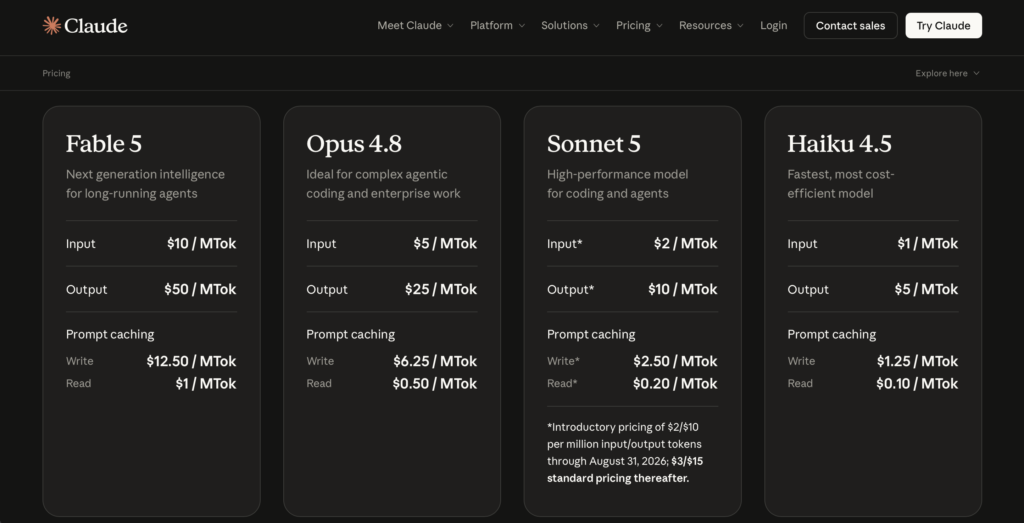
Free tier verdict: ✅ Worth using — strong writing quality, no feature stripping
Claude’s free tier is one of the more generous in the AI market. You get real access to Claude’s core writing and reasoning capabilities — the same model, just with daily usage limits. The quality of the free outputs matches or exceeds what you get from most paid alternatives.
What the free tier does NOT include: Extended context for very long documents, unlimited projects, and consistent access without hitting daily limits. Heavy users will run into caps — typically a few extended conversations per day.
Is paid worth it? For daily professional use, yes. Claude Pro ($20/month) removes the daily limits, adds access to extended thinking features, and lets you build persistent project workspaces that remember your clients and instructions. For occasional use, stay free.
What you get with Claude Pro ($20/month):
- Higher usage limits — rarely hit in practice
- Projects for organised client workspaces
- Priority access during peak hours
- Access to newer model features as they release
Read our full Claude AI Review 2026.
2. ChatGPT: Free Tier Is Limited. Plus Unlocks the Real Product.
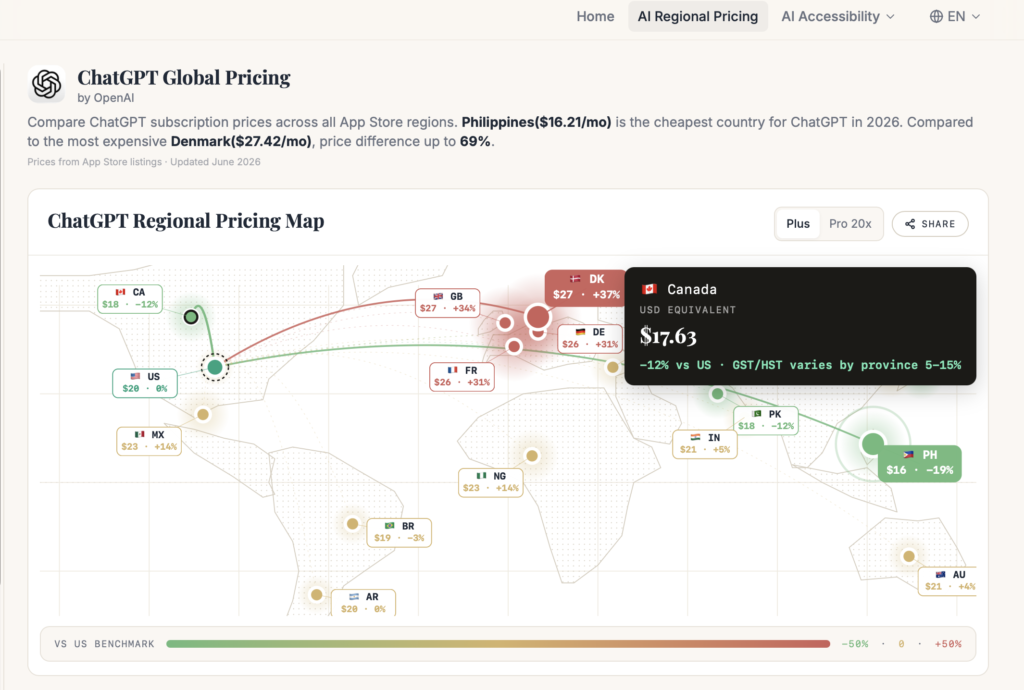
Free tier verdict: ⚠️ Useful for basic queries — but limited in ways that matter for daily work
ChatGPT’s free tier in 2026 runs GPT-5.5 Instant with a hard cap of 10 messages every five hours. US users also see ads. The free tier does not include Deep Research, image generation, voice mode, or Agent Mode.
The real gap between free and Plus is not the model — it’s the features. Both tiers now run GPT-5.5, but free users get GPT-5.5 Instant while Plus unlocks GPT-5.5 Thinking, which handles more complex reasoning tasks. More importantly, every feature that makes ChatGPT genuinely powerful for professional work is behind the paywall.
Is paid worth it? For daily users, yes. ChatGPT Plus ($20/month) unlocks GPT-5.5 Thinking, DALL-E image generation, Deep Research (10 runs/month), voice, Sora, and Agent Mode. If you use ChatGPT for professional work most days, Plus pays for itself in time saved on image generation alone.
What you get with ChatGPT Plus ($20/month):
- GPT-5.5 Thinking — more capable for complex reasoning than the free GPT-5.5 Instant
- No message throttling (significant for daily users)
- DALL-E image generation — replaces a separate tool subscription
- Deep Research — 10 autonomous research tasks/month
- Sora video generation (limited)
- Advanced voice mode with video
- No ads
Read: Is ChatGPT Plus Worth It?
3. Perplexity: Free Tier Is Solid. Pro Depends on Research Volume.
Free tier verdict: ✅ Covers most casual research needs without paying
Perplexity’s free tier lets you search the web with cited answers — a genuinely useful capability with no time-gated limit. You get a reasonable number of daily Pro searches and access to the standard interface.
What the free tier does NOT include: Unlimited Pro mode searches (which use more powerful models), Spaces for organised research projects, and API access.
Is paid worth it? For researchers, journalists, and consultants who use Perplexity heavily for professional work — yes. For occasional research, the free tier holds up well. This is the AI tool where the free-to-paid decision is most genuinely individual.
What you get with Perplexity Pro ($20/month):
- Unlimited Pro searches (access to more capable models)
- Spaces — organised research project folders
- File upload for document analysis
- API access for developers
Read our full Perplexity AI Review 2026.
4. Grammarly: Free Tier Is Strong. Pro Is Worth It for Client Work.
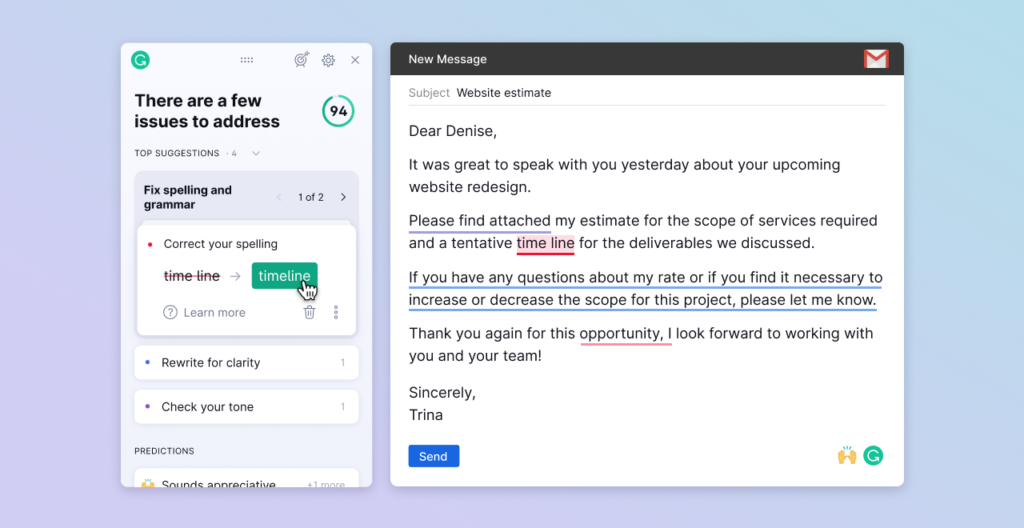
Free tier verdict: ✅ Excellent for basic grammar and spelling — genuinely useful
Grammarly’s free plan is one of the strongest free tiers in this comparison. It catches grammar, spelling, and punctuation errors across Gmail, Google Docs, LinkedIn, and your browser as you type. For personal use, many people never need to upgrade.
What the free tier does NOT include: Tone adjustments, full clarity and conciseness suggestions, plagiarism detection, and advanced style rewrites. The free tier flags errors — Pro rewrites them.
Is paid worth it? For freelancers and professionals who send polished written work to clients — yes. At $12/month (annual), Grammarly Pro is the lowest-cost upgrade on this list and it makes a visible difference in the quality of client deliverables. The plagiarism checker alone is worth the price for content writers.
What you get with Grammarly Pro ($12/month, annual):
- Full clarity, tone, and conciseness suggestions
- Plagiarism detection across 16 billion web pages
- Advanced style rewrites
- Works inside Gmail, Docs, LinkedIn, Slack, and most browsers
5. Rytr: Free Tier Is Functional. Paid Only Worth It If You Hit the Cap.
Free tier verdict: ✅ Good for light use — 10,000 characters/month covers occasional tasks
Rytr’s free plan gives you 10,000 characters per month — roughly 1,500–2,000 words of generated content. For occasional use, this is enough. The free tier includes all use case templates (email, blog, ad copy, social) and the built-in plagiarism checker.
Is paid worth it? Only if you hit the 10,000-character limit. The Saver plan at $9/month removes the cap and adds custom use cases. This is the lowest-cost upgrade on this list and a sensible step if Rytr has become a regular part of your workflow.
What you get with Rytr Saver ($9/month):
- Unlimited character generation
- Custom use cases
- Priority support
Try Rytr: decodetools.com/go/rytr
6. NeuronWriter: Free Tier Is Too Limited to Be Useful. Paid Is Justified for SEO Writers.
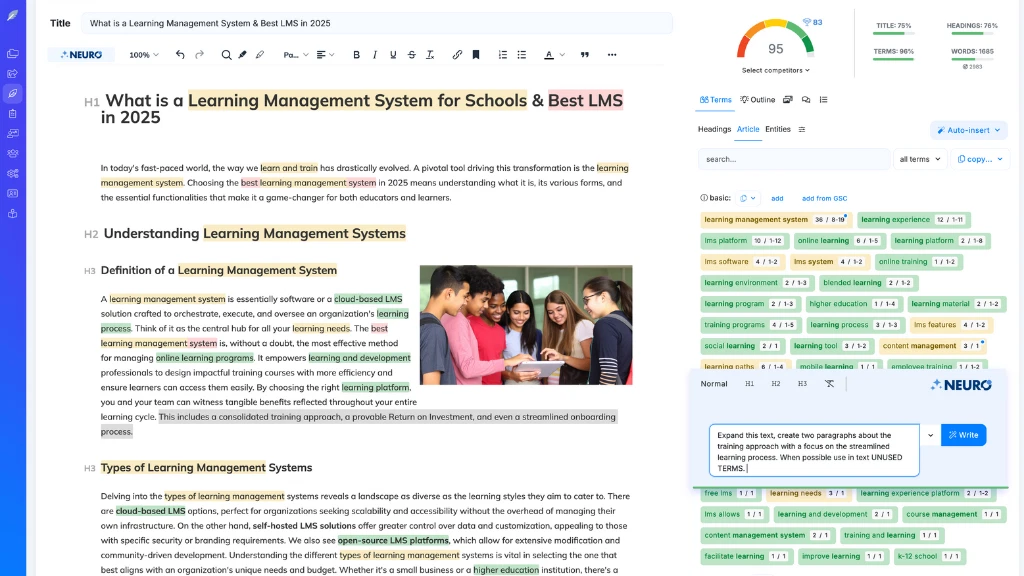
Free tier verdict: ⚠️ Very limited — only a handful of free queries per month
NeuronWriter’s free tier gives you a small number of content queries per month — not enough to run a real content production workflow. It functions more as an extended trial than a genuinely useful free tier.
What the free tier does NOT include: Sufficient monthly queries for regular use, GSC integration, and the full NLP recommendation set. The free tier shows you what the tool can do — it does not let you rely on it.
Is paid worth it? For SEO writers producing regular client content, yes. NeuronWriter’s plans start at $19/month and cover NLP-based content optimisation — analysing the top-ranking pages for your target keyword and telling you exactly which topics, phrases, and semantic terms your article needs to compete. For freelance SEO writers, this replaces 2–3 hours of manual competitor analysis per article.
I ran NeuronWriter on a competitive keyword alongside a manually researched brief. The tool surfaced 34 topics and 18 specific phrases the top-ranking articles shared — content I would have missed in a manual pass. The draft I produced using the recommendations scored 78/100 on first submission versus 51/100 for my unaided draft on the same keyword. For SEO content writers, that gap is the whole product.
What you get with NeuronWriter paid plans (from $19/month):
- NLP-based topic and phrase recommendations drawn from top-ranking competitors
- Real-time content scoring as you write
- Google Search Console integration for tracking live performance
- Content brief generation
- AI writing assistance built into the editor
At $19/month it is the most affordable serious SEO content tool available — significantly cheaper than Surfer SEO ($89+/month) or Frase ($49/month) for comparable core optimisation functionality.
Try NeuronWriter: decodetools.com/go/neuronwriter
7. HyperWrite: Free Tier Is Useful But Capped. Paid Suits High-Volume Daily Writers.
Free tier verdict: ✅ Genuinely useful — TypeAhead works across your browser with a daily usage cap
HyperWrite works differently from every other tool on this list. Rather than living in its own editor, it runs inside your browser — surfacing AI suggestions directly inside Gmail, Google Docs, LinkedIn, and any other web app you are already using. The free tier gives you real access to TypeAhead with a daily cap on suggestions.
What the free tier does NOT include: Unlimited TypeAhead suggestions, the full AutoWrite feature for longer drafts, and the Assistant panel for complex tasks. The daily cap is the main friction point — it runs out during heavy email days.
Is paid worth it? For professionals who write constantly across multiple tools all day — emails, proposals, LinkedIn messages, CRM notes — yes. HyperWrite Premium at $19.99/month removes the cap and gives you unlimited in-context AI assistance without switching tabs. For occasional writers, the free tier is enough and the upgrade is hard to justify.
I tested HyperWrite Premium for four weeks across a typical workday: 20–30 emails, 3–4 LinkedIn posts, and client proposal drafts. The tab-switching I had previously done to reach Claude or ChatGPT for individual sentences dropped by roughly 70%. The quality per suggestion is lower than Claude or ChatGPT on complex tasks, but for one-sentence completions and quick paragraph drafts inside existing tabs, it is faster than any alternative. The upgrade pays for itself if you write more than 50 short-form pieces per week across different tools.
What you get with HyperWrite Premium ($19.99/month):
- Unlimited TypeAhead suggestions across all browser tabs
- AutoWrite for longer draft generation in-context
- Full Assistant panel for research and multi-step tasks
- Works inside Gmail, Google Docs, LinkedIn, Notion, and most web apps
Try HyperWrite: decodetools.com/go/hyperwrite
The Decision Framework: When to Pay vs Stay Free
Use this to make the call for any AI tool:
Stay free if:
- You use the tool fewer than 3 times per week
- You have never hit the free tier’s usage limits
- The paid features are nice-to-have, not essential to your workflow
- You are still evaluating whether the tool fits your needs
Pay if:
- You hit the message or character cap regularly
- A specific paid feature — image generation, Deep Research, unlimited outputs — would directly save you time
- The tool is part of your daily workflow and the time savings would exceed the monthly cost
The maths test: If a tool saves you 30 minutes per week, it saves 26 hours per year. At any professional hourly rate, that is worth $20/month. If the time saving is less than 30 minutes per week, the free tier is probably the right call.
Free AI Tools Worth Using Right Now
Not everything needs a paid plan. These free tools are genuinely capable without any payment:
- Claude Free — strong writing and research with daily limits
- ChatGPT Free — GPT-5.5 Instant access with message limits, good for occasional use
- Perplexity Free — cited web search with reasonable daily limits
- Grammarly Free — grammar and spelling in your browser, permanently free
- Rytr Free — 10,000 characters/month of writing assistance
See our full guide: Free AI Writing Tools That Actually Work
Want the paid vs free verdict as a free one-page reference? Every major AI tool — what the free plan gives you and exactly when to upgrade. Get it free →
Frequently Asked Questions
Are free AI tools good enough for professional work? Depends on the tool and the volume. Claude Free and ChatGPT Free are good enough for occasional professional tasks. For daily professional use, their message limits become a practical constraint. Grammarly Free is strong enough for most professional writing without upgrading.
Which AI tool has the best free plan? Claude and Perplexity have the most generous free tiers in terms of actual capability. Both offer real, unstripped access to their core functions — just with usage limits rather than feature blocks.
Is it worth paying for multiple AI tools? Rarely. Most freelancers and solo operators need one strong general-purpose AI (Claude or ChatGPT Plus) and one specialist tool (NeuronWriter for SEO, Grammarly for editing, or HyperWrite for browser-native writing). Beyond two subscriptions, the return diminishes and the workflow complexity increases.
What is the cheapest paid AI tool worth using? Rytr at $9/month is the lowest-cost paid AI writing tool that delivers genuine value. For SEO work, NeuronWriter at $19/month is the next step up. For a full-featured general assistant, Claude Pro and ChatGPT Plus both land at $20/month.
Should I start with free AI tools before paying? Yes. Start with the free tiers of Claude, ChatGPT, and Grammarly. Use them for 2–4 weeks on real tasks. When you consistently hit the limits or identify a specific paid feature that would solve a workflow problem, upgrade. Do not pay speculatively.
Related Articles
- Best AI Writing Tools 2026
- Free AI Writing Tools That Actually Work
- Free ChatGPT Alternatives 2026
- Is ChatGPT Plus Worth It?
- Best AI Tools for Freelancers 2026
Pricing verified July 2026.